


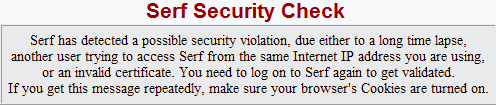
Serf Security Check typically occurs when the following happen.
- If you are logged into the course and there's no activity for long period of time, the system will close your session. To fix this: While you are in the course avoid having no activity for long periods of time.
- You can only have 1 session open at a time. If you are logged into the course and you try to log in again while the other session is open, a Serf Security Check will occur. To fix this: When you are done with the course, please properly logout by clicking the Logout button at the top of the course page or on the blue Student Control Panel. Do not close the internet browser. Do not attempt to have multiple sessions open at the same time.
- Repeated logouts due to Serf Security Checks is usually because of some type of firewall (security) setting on the computer. Your computer may have programs such as Norton Internet Security (Norton Firewall), ZoneAlarm, or any other firewall programs that is conflicting with our course.
We highly recommend you try Option 1 first. If Option 1 doesn't work, please try Option 2.
Option 1: Install FREE Mozilla Firefox 3.6 browser. Using Firefox usually gets around the Serf Security Check issue without having to disable your firewall.
Mozilla Firefox 3.6
http://www.mozilla.com/en-US/
Option 2:
- Please try to turn OFF and then turn ON your internet modem. Wait until the modem has fully restarted.
- Then turn OFF and ON your computer.
- Launch your web browser and log into the course.
- Scroll to the bottom of the page until you see blue Student Control Panel. Above the control panel are Left and Right arrows. The right arrow (Next button) allows you to go to the next page. Click the Next button.
- Are you able to go to the next page? If you are able to go to the next page, please scroll down again and click the Next button to go to the next page. Repeat this several times and see if it doesn't log you out.
Option 3: You may want to try to disable your firewall program and see if that resolves your issue.

© 2010 connect for education
