






Security features in Internet Explorer might require you to include our URL in your Internet Explorer Trusted Sites list. To do this, please follow these steps:
- In the Microsoft Internet Explorer, click the Tools menu.
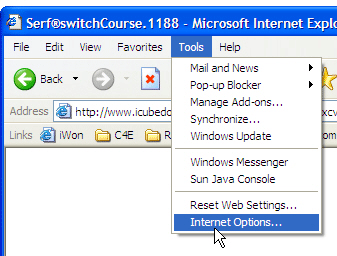
- Select Internet Options.
- Click the Security Tab.
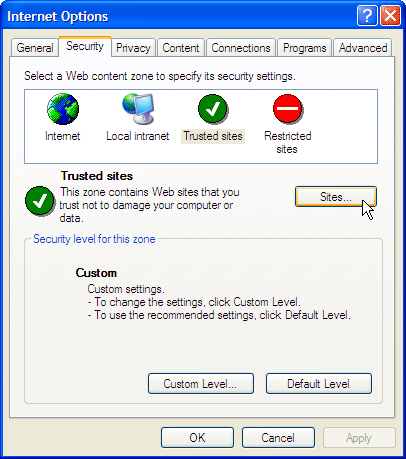
- Click Trusted sites icon.
- Click Sites... button.
- Uncheck the "Require server verification (https:) for all sites in this zone" box.
- Type www.connect4education.org in the "Add this Web site to the zone" field.
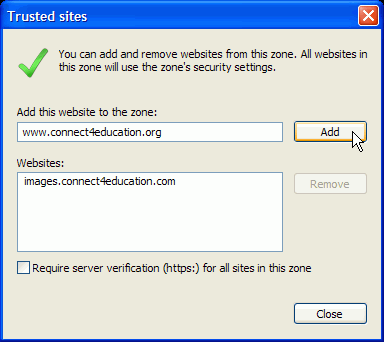
- Click Add. You will see the address you just typed in the "Web sites" list.
- Type images.connect4education.com in the "Add this Web site to the zone" field.
- Click Add. You will see the address you just typed in the "Web sites" list.
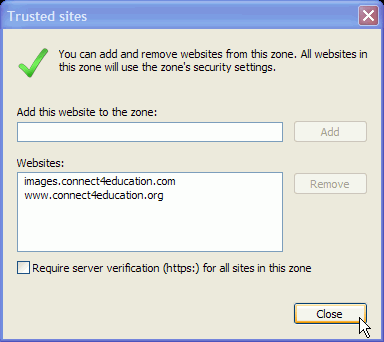
- Click OK or Close in the Trusted Sites window.
- Click OK in the Security Tab window and close Internet Explorer.
Now you have added our company URLs to the list of Trusted Sites in Internet Explorer. The display problems caused by the security settings in Internet Explorer should be resolved.
